Work/Healthcare Triage App
Artificial Intelligence Diagnostic Assistant (AIDA)
AIDA is an AI powered mobile app that helps young professionals understand symptoms calmly and confidently through intelligent health triage and personalized care recommendations
Overview
AIDA is an AI powered mobile app that helps young professionals understand symptoms calmly and confidently through intelligent health triage and personalized care recommendations
Problem
Young professionals lead demanding lives, long work hours, tight schedules, and limited time to manage their health. When they experience symptoms, they face a frustrating dilemma: is this serious enough to see a doctor, or can it wait?
This uncertainty leads to two costly extremes: Undertreating — ignoring symptoms that later escalate into serious conditions Overtreating — rushing to the ER for minor issues, wasting time and money
Existing tools like WebMD fuel health anxiety with walls of worst-case diagnoses. There is no intelligent, calm, and trustworthy tool that helps people decide the right level of care for their situation.
Research
The problem space
The starting observation was simple: when a symptom shows up, most people don't actually know which path to take.
Searching online can quickly spiral into worst-case scenarios. A headache can become a brain tumor after three clicks. Booking a clinic visit can be slow and often unnecessary for something minor.
Going to the ER can feel like the safest option for someone who is anxious about their symptoms, but it's expensive, overcrowded, and usually not the right option for a non-emergency.
None of these options really help someone understand how urgent their situation is. They simply shift the anxiety around.
That gap between "I don't feel right" and "I know what to do about it" was the problem AIDA set out to solve.
Competitive audit
I reviewed existing AI symptom checkers including Ada Health, Babylon, WebMD Symptom Checker, and Buoy Health. I went through their intake flows and looked through App Store reviews to identify recurring language, pain points, and patterns.
A few things stood out consistently.
Most intake flows rely on long, form-heavy questionnaires. Users may have to go through 10–15 screens of checkboxes and questions, making the experience feel more like paperwork than help.
The results also tend to use cautious, over-clinical language such as "this may be indicative of..." This can leave users just as uncertain as they were before using the app.
Very few of the apps provide a clear next action. They explain possible causes but often stop short of telling the user what they should actually do.
Method
This was a self-directed concept project, so the research was approached as a structured teardown rather than a funded clinical study.
The process involved competitor flow mapping, reviewing App Store feedback for recurring language and pain points, and looking at established friction points in digital health UX, such as long forms, clinical language, and decision paralysis.
The goal wasn't to create a diagnostic engine. It was to design the experience around one, assuming the underlying AI logic was already in place.
Insights
Anxiety is part of the UX problem, not just the medical problem.
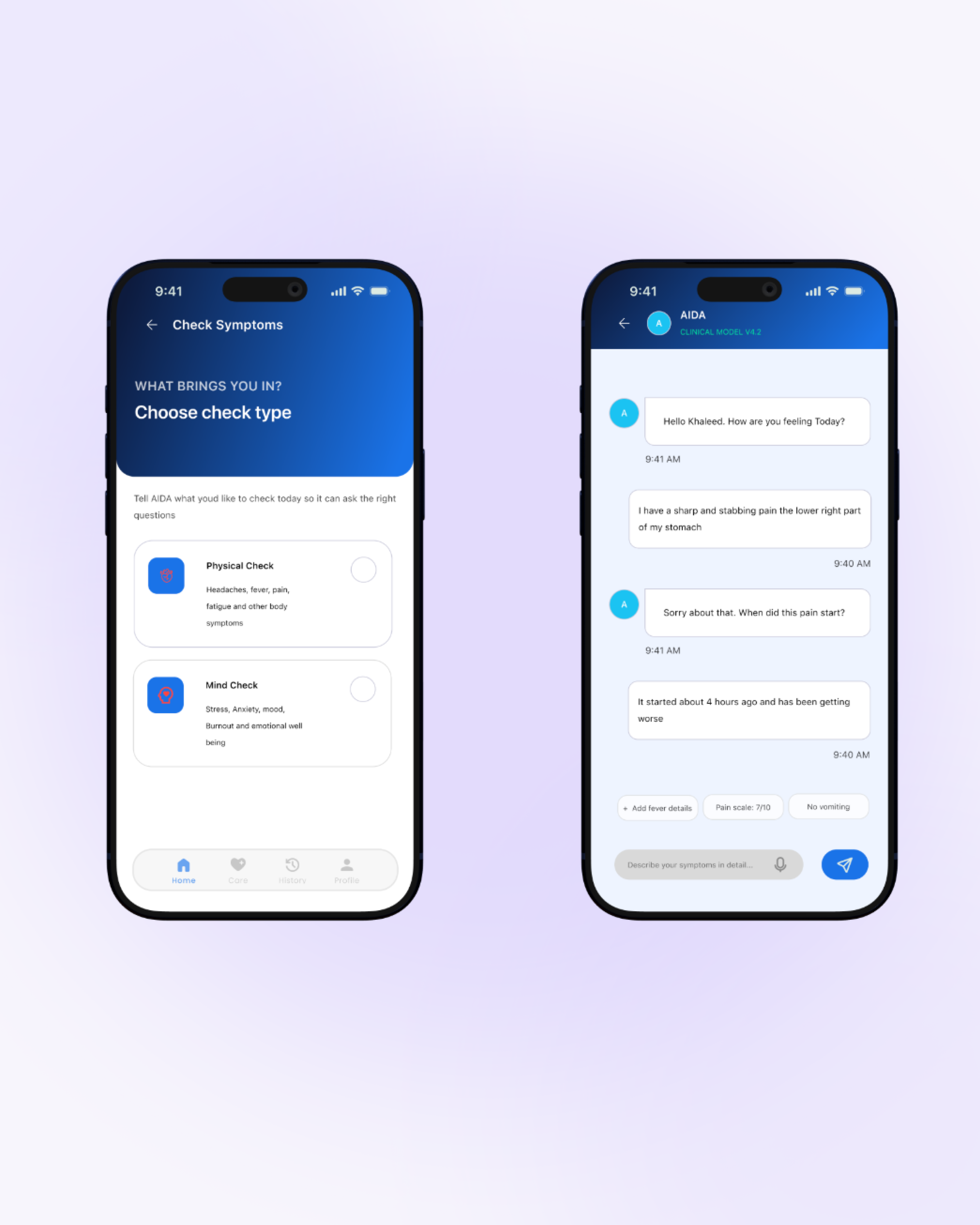
Users aren't only looking for information. They also want reassurance and a clear understanding of what to do next. This led to the decision to use a conversational intake flow instead of a traditional clinical form.
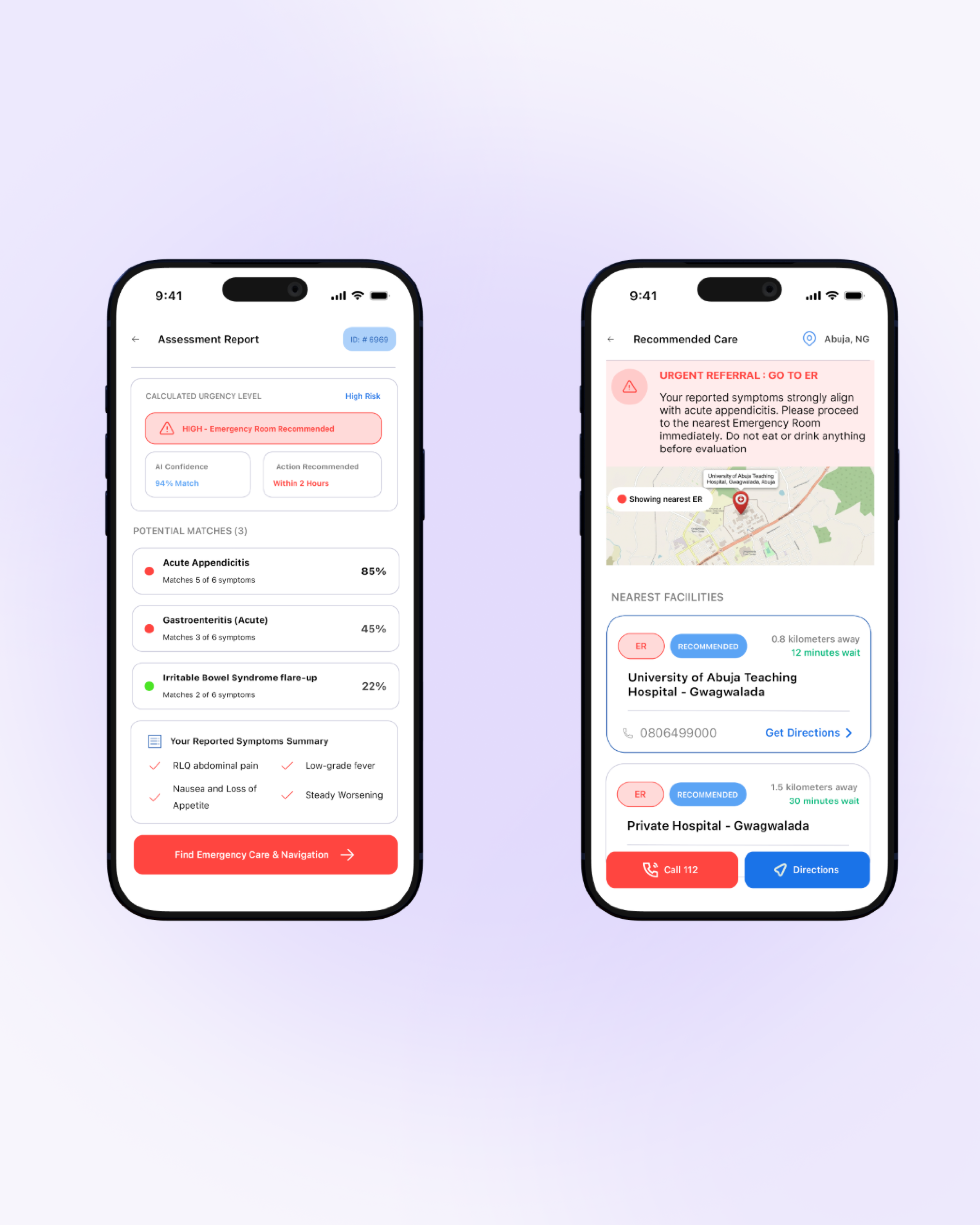
A simple "worried vs. not worried" approach also doesn't work particularly well. A three-tier urgency system, such as Self-care, See a doctor soon, and Seek urgent care, provides users with a clearer middle ground.
This avoids forcing users into a false choice between "it's nothing" and "go to the ER."
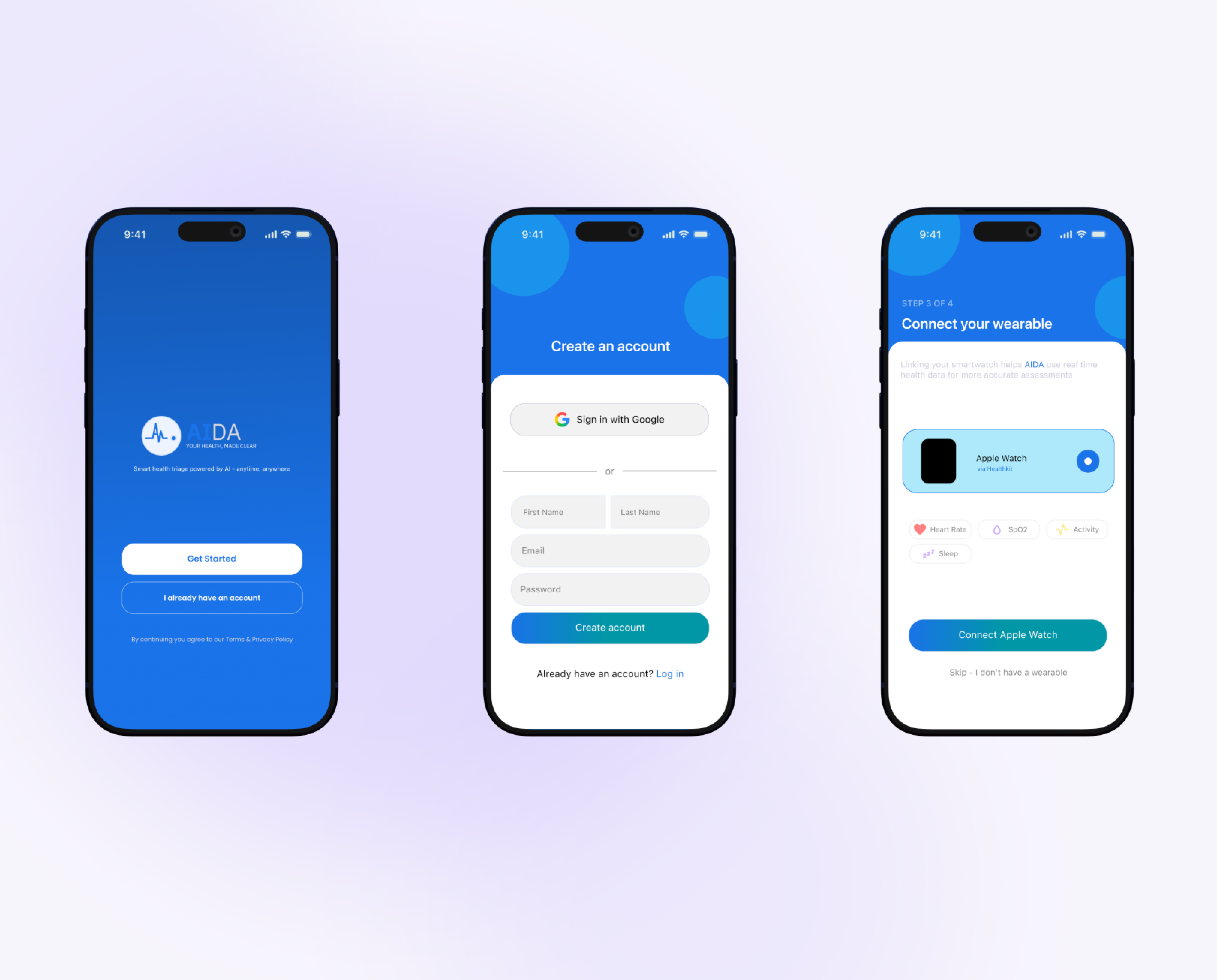
Wearable integration was another area that changed during the process.
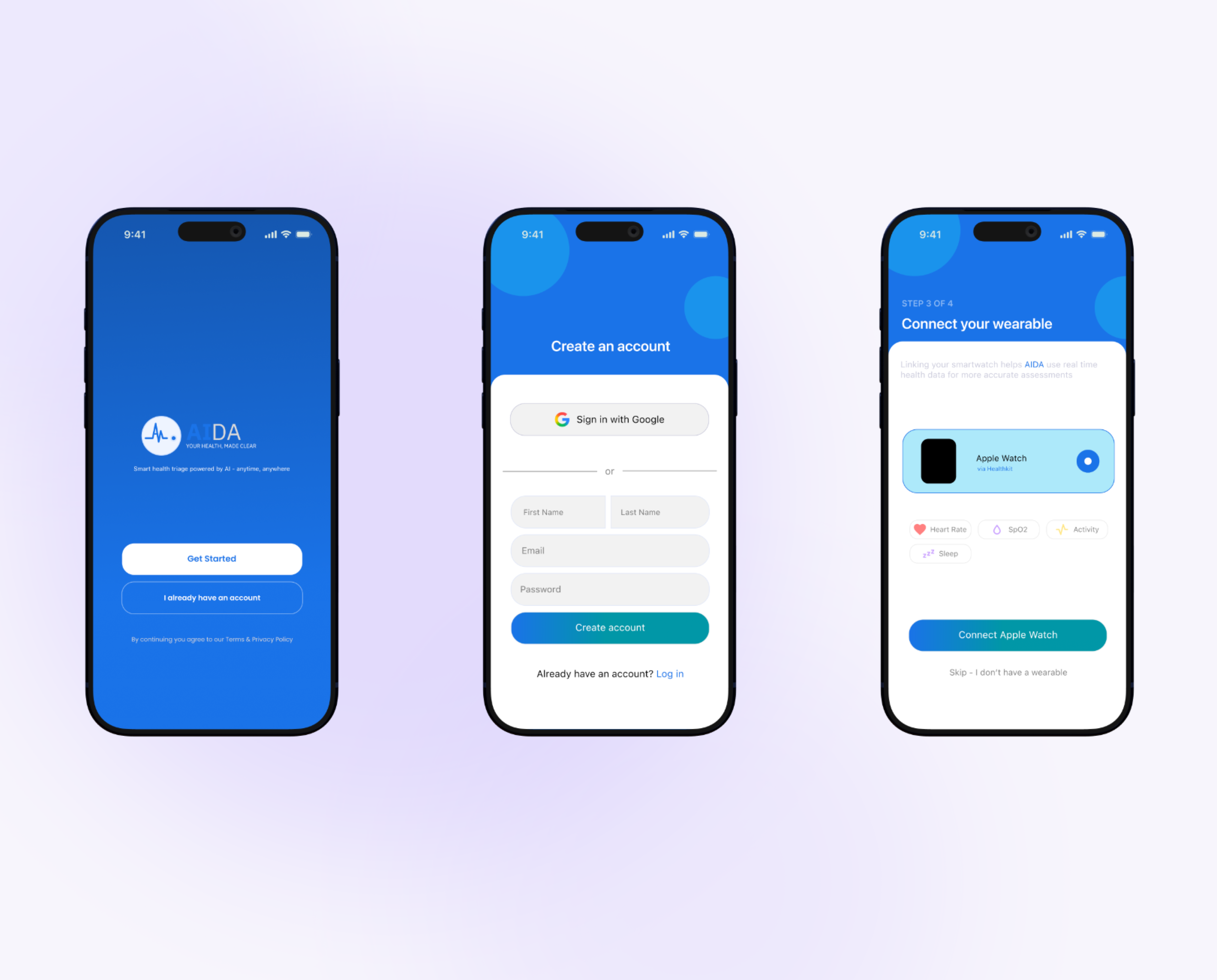
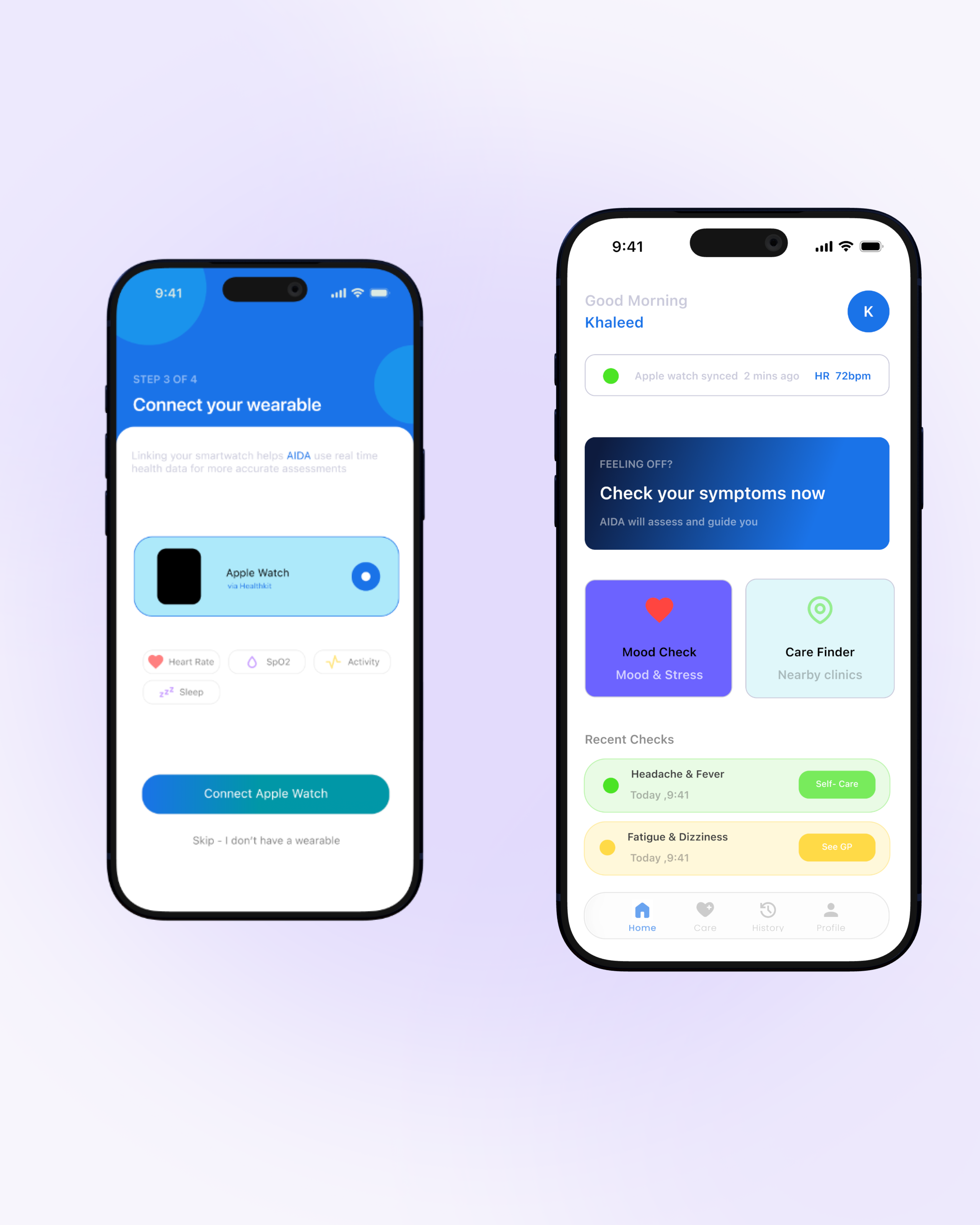
The early concept included syncing biometric data from wearables such as heart rate, sleep, and activity data. The thinking was that having more information could lead to better triage.
However, this introduced several problems. It created a permissions and trust hurdle during onboarding, especially because health data feels more sensitive than simply answering a question. It also introduced another design surface that could take attention away from the actual conversation.
More importantly, it expanded the scope enough to turn a focused triage tool into something closer to a general health-tracking app.
Removing wearable integration kept the core idea focused: tell me what's wrong, and I'll tell you what to do.
Process
The design process started with low-fidelity wireframes, where I mapped the core conversational flow from symptom entry through clarifying questions, the urgency result, and the recommended action.
I then moved into mid-fidelity designs and focused on the triage result screen. This was the highest-stakes moment in the experience because users needed to understand and trust the result immediately.
The final stage was high-fidelity design in Figma, where I applied the final visual language.
Key pivot
The first version of the intake experience was a traditional multi-step form with checkbox-based symptom lists and dropdown severity scales.
This was essentially the same pattern that had already been identified as a problem during the competitive audit.
Looking back at the design through the insight that anxiety is part of the UX problem made the mismatch obvious. A form doesn't do much to reassure someone who is already worried about their symptoms.
I rebuilt the intake as a chat-style conversation. This allowed the experience to ask one clarifying question at a time instead of presenting the user with a long questionnaire all at once.
Decisions
Color: Midnight Navy + Bioluminescent Cyan
I chose Midnight Navy and Bioluminescent Cyan instead of the typical clinical white and blue often seen in health apps.
The navy helps create a sense of calm and trust without making the interface feel sterile. The cyan accent is used for AI-guided moments, such as the thinking state and results, giving them a sense of intelligence and clarity without making the interface feel cold.
Typography: Cormorant Garamond + DM Sans
Cormorant Garamond was chosen for headlines to introduce a sense of warmth and humanity.
This was particularly important because AIDA is a health product, and users may already feel worried or uncertain when they open the app.
DM Sans is used for body copy and interface text because of its clarity and legibility, particularly in situations where users may already be under stress.
Conversational intake over a form
The symptom-entry experience was designed as a conversation rather than a traditional form.
The idea was to make users feel like they were being guided through the process rather than interrogated by a clinical checklist.
Three-tier urgency triage
The triage system was deliberately kept simple: Self-care, Doctor soon, and Urgent care.
The goal was to provide enough nuance to make the recommendation useful without forcing users to interpret a complicated scale while they are already anxious.
Final product
The finished concept delivers a conversational symptom-intake flow that feels human rather than clinical.
It also provides a clear three-tier urgency result screen designed to be understood at a glance.
The visual identity combines navy and cyan with Cormorant Garamond and DM Sans to create a balance between trust, calm, and intelligence.
What's next
With the core triage experience established as a concept, a logical next step would be to revisit wearable integration.
Rather than introducing it during onboarding, it could become an optional, later-stage feature once users have already developed trust in the core conversational experience.
If a lightweight real-user test is eventually conducted, the current "self-directed teardown" framing in the Research section could also be replaced with real user quotes and data.